Key takeaways
- Fix the period rule first — a trip belongs to the month it ended — and state it on the statement so the owner can reconcile without asking.
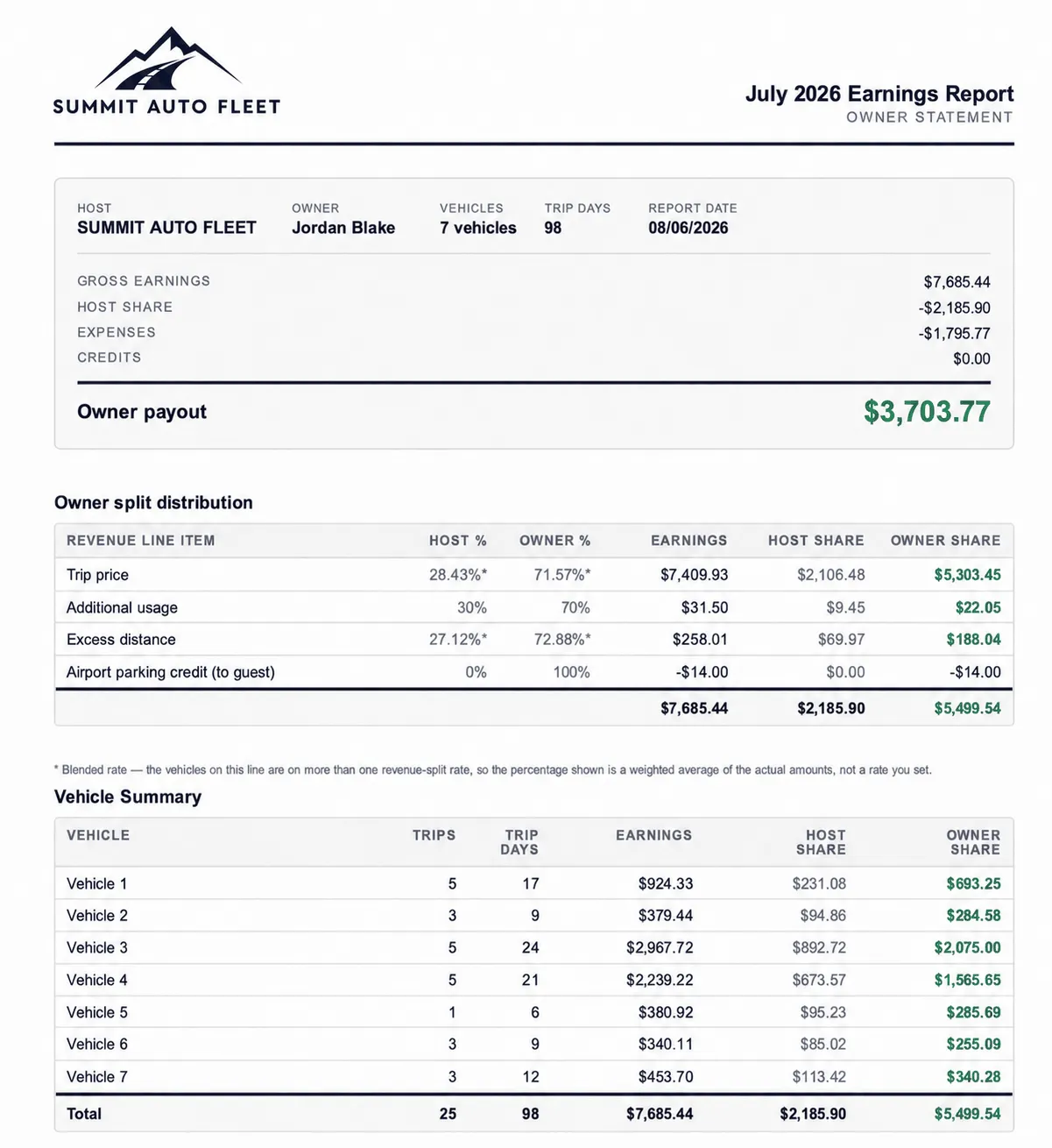
- Show gross trip price, Turo’s share as its own line, then net payout; showing only one leaves the owner unable to reconcile against what they know.
- Only costs traceable to that specific vehicle belong on its statement; overhead spread by formula is an allocation, and allocations invite arguments you cannot win with evidence.
- Show the split arithmetic, not the conclusion, and restate the terms in words every month — 70% of net after agreed operating costs, not 70% alone.
- Reconcile before sending: the statement total, what left your account, and your books must agree, and any line should trace to a source document in under a minute.
This is the mechanical version of what belongs on an owner statement — the actual sequence for producing one that survives questions.
Step 1: Fix the period rule
Before pulling any data, decide what belongs in the month and write it down: a trip belongs to the period in which it ended.
Trip end is the most defensible boundary because it’s when the trip completes, when damage would be reported, and when reimbursements are finalized. Any rule works as long as it never changes — but changing it once destroys year-over-year comparability and invites exactly the questions you’re trying to prevent.
State the rule on the statement itself.
Step 2: Pull revenue at trip level
For the vehicle, for the period:
- Gross trip price
- Turo’s share at the plan rate — 70%, 80%, or 90% depending on which earnings plan the car is on
- Net Turo payout
- Trip count and booked days
- Guest reimbursements collected, itemized
Booked days matter more than operators expect. It’s the line that answers “why was this month lower,” and having it on the page prevents the message asking.
Step 3: Pull costs attributed to that vehicle
Only costs belonging to that specific car:
- Cleaning and turnover
- Fuel or charging not recovered
- Maintenance and repairs, each with date and vendor
- Damage responsibility on any claim — $250, $1,500, or $2,750 depending on plan
- Tolls and citations
- Storage or parking
If a cost can’t be attributed to a vehicle, it doesn’t belong on a vehicle’s statement. Overhead spread across cars by formula is an allocation, and allocations invite arguments you cannot win with evidence.
Step 4: Apply the split visibly
Show the arithmetic, not the conclusion:
Net Turo payout            $1,282.00
Less operating costs        −$350.00
Net before split            $932.00
Owner share (70%)           $652.40
Operator share (30%)        $279.60
Restate the split terms in words every month. Not a reference to the agreement — the terms themselves. An owner reading “Owner share (70%)” without knowing 70% of what has to trust you; one reading “70% of net after agreed operating costs” can verify.
Step 5: Settle and explain
- Amount owed to owner
- Payment date and method
- Any correction or carryover from a prior period, with a one-sentence reason
- A short note on anything unusual — a long repair, an open claim, a slow month
That note is the highest-leverage element on the page. It converts a surprising number from a suspicion into a known circumstance.
Step 6: Reconcile before sending
Three numbers must agree:
- The statement total
- What actually left your account
- What your books say for that vehicle, that period
If they disagree, do not send it. A statement whose total happens to be right but can’t be traced is a statement you cannot defend when asked — and you will be asked eventually, usually about a month you no longer remember.
The trace test: pick one line at random and follow it to a source document — a Turo trip record, a bank transaction, a repair invoice — in under a minute.
Step 7: Send on the same day, every month
Turo’s own Passive Income Hosting program pays owners on the 15th, which is a reasonable default. The specific date matters far less than never varying it. Predictability is most of what owners mean when they say an operator is professional.
Doing this at scale
Five statements is an evening. Twenty is a weekend, and it’s the weekend that gets skipped.
The structural fix is generating statements from the same ledger that produces your per-vehicle P&L, rather than assembling them separately. FleetPilot does this by matching trips, payouts, platform fees, repairs, tolls, and claims to the right vehicle and the right owner automatically — so the statement and the books are two views of one dataset and don’t drift apart. Start on the Free plan — no credit card required.
If you’re not there yet, the prerequisite is a ledger where costs attach per vehicle — see how to import your Turo earnings.
Frequently asked questions
What is the fastest way to produce Turo owner statements?
+
Generate them from the same ledger that produces your per-vehicle P&L. Building statements separately from your books guarantees the two drift apart, and reconciling them afterward takes longer than producing them correctly once.
Should an owner statement show gross trip price or net payout?
+
Both. Lead with gross trip price, show Turo's share as its own line, then net payout. Showing only one leaves the owner unable to reconcile the statement against what they know about the trips.